Presence-Aware Lighting in Home Assistant Using a YAML Blueprint
Tired of lights turning off too soon? This is how I built a presence-aware lighting system in Home Assistant using a blueprint.
February 2026 edit: I’ve significantly updated the blueprint since this post was first published. The new version adds rising-edge detection, binary device control, custom script triggers, per-period auto-on toggles, and a proper daytime mode. I’ve updated the article below to reflect all these changes — the gist is always the canonical source.
I’ve automated my home with Home Assistant for years, but motion-sensor-based lighting always annoyed me — it often turns off while you’re still in the room. You know the feeling. Walking into a room, the light turns on, but it turns off at the first quiet moment even if you’re still sitting there reading, listening to music, or watching TV.
So I decided to build a proper presence-aware automation system right in Home Assistant as a blueprint. The idea is simple:
- Each room has a set of sensors that define “presence” (motion sensors, media players, PCs, whatever)
- Lights — and optionally switches, fans, and other devices — turn on automatically based on time of day and room occupancy
- Rising-edge detection means lights only turn on at the moment a room transitions from empty to occupied, not on repeated sensor triggers. If you manually turn off a light while still in the room, it stays off until you leave and return.
- Lights turn off after a configurable timeout, but with a flash warning before turning off
- Each time period — day, sunset, and night — has its own scene, timeout, and auto-on toggle
- Custom scripts can fire when a room becomes occupied or empties
- Occupancy is exposed via input booleans, so other automations can use it
- The blueprint is reusable across all rooms through simple UI configuration
I’ll walk you through how I set it up, what it does, and how you can extend it.
My First Attempt
When I first installed Home Assistant, many tutorials online recommended using Node-RED for automations. Admittedly, the visual flow-based approach is appealing, but it quickly became unwieldy for anything non-trivial.
Here is what my Node-RED flow looked like for my home’s presence lighting:
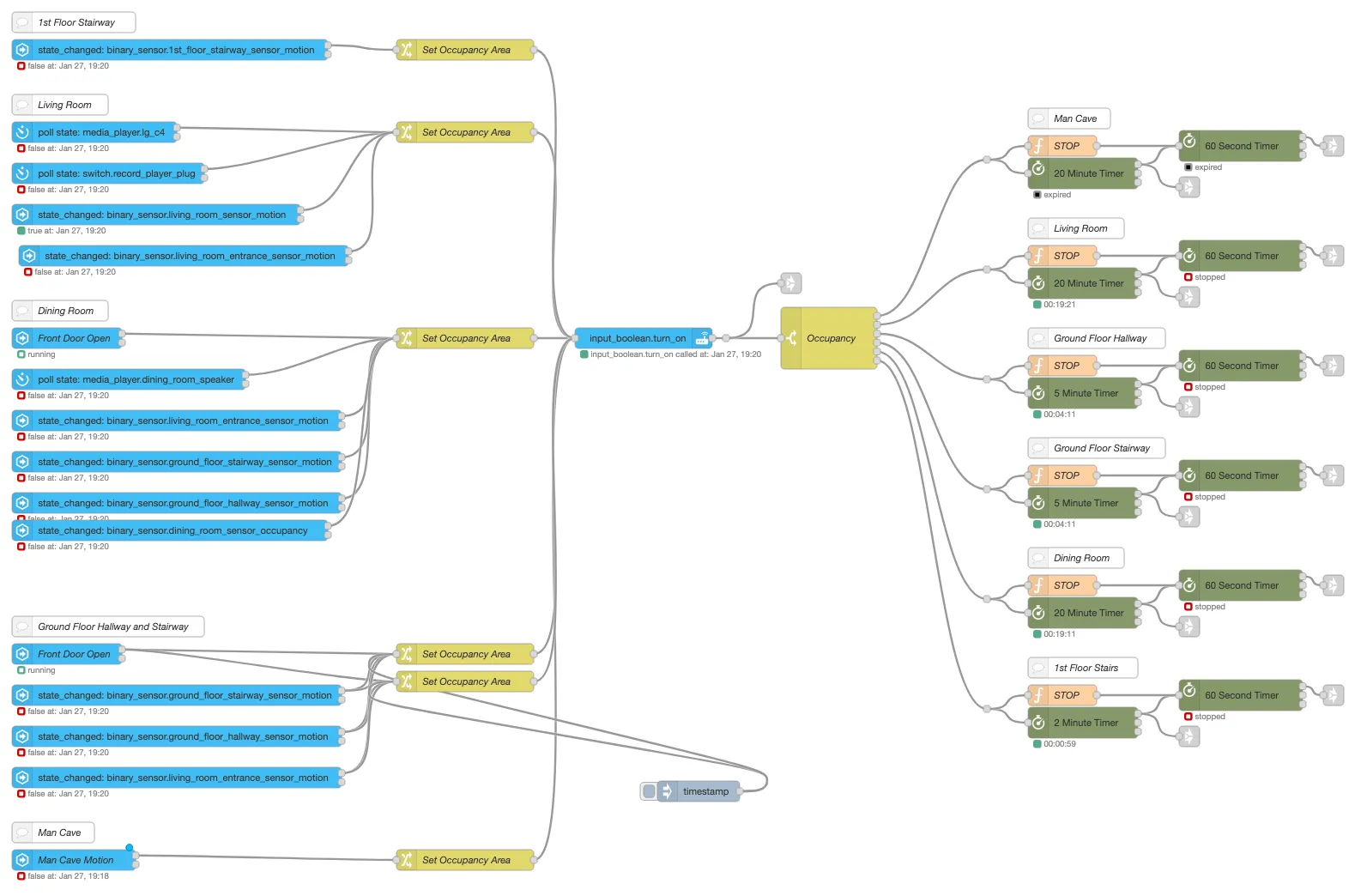
I’m a big fan of clean, maintainable code, and this just wasn’t cutting it. So I decided to scrap Node-RED and implement the entire logic as a reusable blueprint (with the help of ChatGPT — seriously, it’s a game-changer for writing automations).
Prerequisites
Before we start, you should have:
- Home Assistant up and running
- An
input_booleanper room for occupancy tracking (e.g.input_boolean.occupied_office) — this is now required for rising-edge detection - (Optional) An
input_booleanper room to enable/disable all automated actions:input_boolean.auto_<room> binary_sensor.sunsetandbinary_sensor.night_modehelpers (you can create these using the Time of Day) integration.
These can go in your configuration.yaml. The Night Mode sensor can be set up from the UI or in YAML, but the sunset sensor needs to be added in YAML like this:
binary_sensor:
  - platform: tod
    name: Sunset
    after: sunset
    after_offset: "-00:30"
    before: sunrise
    unique_id: sunset
  - platform: tod
    name: Night Mode
    after: "22:00:00"
    before: "05:00:00"
    unique_id: night_mode
We’re going to use a blueprint, so it’s portable, maintainable, and reusable across all rooms.
Room Configuration
The blueprint lets you configure each room through the Home Assistant UI. When you create an automation from the blueprint, you’ll configure:
- Presence entities: Motion sensors, media players, or any device that indicates someone is present. I have an ICMP ping sensor for my PC that marks me as present when it’s on the network.
- Lights: Which lights to control (can be multiple)
- Binary devices (optional): Switches, smart plugs, fans — anything that should turn on/off with presence, independently of lighting
- Scripts (optional): On-presence scripts fire when the room first becomes occupied (rising edge), and on-no-presence scripts fire when it empties (falling edge). Handy for things like setting modes or triggering cleanup actions.
- Scenes (optional): Separate scenes for day, sunset, and night
- Auto-on toggles: Per-period control over whether lights turn on automatically
- Timeouts: Separate timeouts for day, sunset, and night
For example, my man cave configuration looks like this:
- Presence Sensors:
binary_sensor.man_cave_sensor_motion,media_player.man_cave_tv,sensor.man_cave_pc_ping - Lights:
light.man_cave - Sunset Scene:
scene.man_cave_stranger_things - Night Scene:
scene.man_cave_sleepy - Day Auto-On: Off (no need for lights during the day in there)
- Timeouts: 10 minutes (day and sunset), 5 minutes (night)
A few things to note:
- Presence sensors can include motion sensors, media players, PCs, or any device that can indicate someone is present. Media players are considered “active” when playing, paused, or on (but not idle, standby, or off).
lightsis a list, so you can control multiple lights per room.- Each time period has its own scene. If no scene is defined, the fallback is 100% brightness during the day, 80% at sunset, and 5% at night.
- Each period also has its own auto-on toggle — so you can have lights auto-turn-on at sunset and night but not during the day, while still auto-turning-off in all periods.
- The occupied helper is required and powers the rising-edge detection. It ensures lights and devices only activate once per occupancy cycle, not every time a bursty motion sensor fires.
How It Works
The automation has two main branches:
1. Presence Detected (Rising Edge)
When any of the room’s presence entities turn on:
- Mark the room as occupied (
input_boolean.occupied_<room>). - Rising-edge check: if the room was already occupied, stop here. This is the key improvement — the automation only acts on the transition from empty to occupied, so bursty motion sensors and repeated triggers don’t re-fire your lights or scripts.
- If the automations toggle is enabled:
- Turn on any configured binary devices (switches, fans, plugs).
- Fire any configured on-presence scripts.
- If auto-on is enabled for the current time period, turn on lights using the appropriate scene (or fallback brightness):
- Daytime: day scene or 100% brightness.
- After sunset but not night: sunset scene or 80% brightness.
- Night mode: night scene or very dim lights (5%).
The rising-edge approach means that if you manually turn off a light while still sitting in the room, it stays off. The automation won’t fight you — it only acts at the moment you walk in.
2. Presence Cleared (Falling Edge)
When all presence entities in a room are off/inactive:
- Start a timeout countdown — using the timeout for the current period (day, sunset, or night).
- When the timeout expires, if the automations toggle is enabled:
- Flash the lights gently to warn you (a soft brightness pulse).
- Wait 30 more seconds after the flash.
- Turn off the lights.
- Turn off any configured binary devices.
- Fire any configured on-no-presence scripts.
- Mark the room as unoccupied.
This handles the common problem of “lights turning off too early” while still conserving energy. The mode: restart on the automation means if presence is detected during the timeout or flash, the whole thing restarts — so a wave at the motion sensor is all it takes.
The flash is usually followed in our house by a flailing hand gesture to convince the IR sensor that we’re still there!
The Full Blueprint
The blueprint is too long to paste inline now (it’s grown a fair bit!), so I’ve published it as a GitHub Gist. You can import it directly into Home Assistant, or browse and download it from the gist:
View the full blueprint on GitHub Gist →
You can also save it directly into your blueprints/automation/ folder.
Extending and Customizing
- Create a new automation from the blueprint for each room
- Adjust timeouts per room and per period — bedroom might want a shorter night timeout than the office
- Use the per-period auto-on toggles to fine-tune behaviour: I have daytime auto-on disabled in most rooms (I don’t need lights on during the day), but sunset and night auto-on enabled everywhere
- Scenes can be swapped for different moods — golden hours in the evening, “stranger things” (my red and blue 80s theme) for night
- Use on-presence scripts to do things like activate a “movie mode” or start music when you walk into a room, and on-no-presence scripts for cleanup (stopping media, resetting modes, etc.)
- Binary devices are great for things like desk fans or smart plugs that should follow presence without any lighting logic
- Other automations can use the
occupied_<room>helper to adjust heating, music, or notifications - The blueprint uses
mode: restartwhich means if new presence is detected during the timeout, it restarts — perfect for bursty motion sensors
Final Thoughts
This setup gives you presence-aware automation without complicated integrations or scripting. Lights and devices behave intuitively, flash to warn before turning off, and — thanks to rising-edge detection — properly respect your manual overrides. It’s fully reusable across rooms and easy to configure through Home Assistant’s UI.
Give it a try in your Home Assistant setup, and let me know how it works for you or if you have any suggestions. Happy automating!